

Running a service-based business involves more than delivering a service to customers. Business owners also need to manage appointments, prepare invoices, collect payments and maintain accurate transaction records. When these activities are handled separately, daily operations can become difficult to organise.
A Point of Sale (POS) system helps businesses manage billing and payment-related activities through a central interface. While POS systems are often associated with retail stores, they can also support businesses that provide services rather than physical products.
Salons, repair centres, fitness studios and professional service providers may use POS systems to record transactions, accept supported payment methods and review business activity.
Understanding how these systems work can help service providers identify suitable features and decide whether a POS solution fits their operational requirements.
What Is a POS System for Service-Based Businesses?
A POS system is a combination of software and, where required, hardware used to record sales and process payments.
For service-based businesses, the system may support service billing, customer records, payment acceptance and transaction reporting.
For example, a repair centre may use a POS system to generate an invoice for a completed service and record the customer’s payment.
Unlike retail businesses, service providers may not need extensive inventory management. Instead, they may require features for appointments, service charges and recurring customer visits.
The exact capabilities depend on the software and payment services selected.
How POS Systems Differ Between Retail and Service Businesses
Retail businesses typically use POS systems to record product sales and maintain stock information.
Service-based businesses have different operational needs.
Retail POS Requirements
Retail systems often focus on product catalogues, barcode scanning, inventory quantities and sales transactions.
Service-Based POS Requirements
Service businesses may prioritise appointment scheduling, service duration, employee assignments and invoice generation.
For example, a salon may need to record which service was provided and which employee completed it.
A repair centre may need to maintain information about the service performed and any replacement parts used.
Some POS systems support both retail and service functions, but businesses should verify the available features before choosing a solution.
Essential Features of a Service-Based POS System
A suitable POS system should support the everyday activities of the business.
Service Billing
The system should allow employees to generate invoices based on the services provided.
Where applicable, invoices may include service descriptions, quantities, taxes and additional charges.
Multiple Payment Methods
Customers may prefer paying through UPI, cards, cash or other supported methods.
A POS system may help record these transactions in one billing interface.
Appointment Management
Some systems provide appointment scheduling and booking records.
This can be useful for businesses where services are delivered at specific times.
Customer Transaction History
Customer records may help businesses review previous services and payment information, subject to applicable privacy requirements.
Business Reporting
Reporting features can help owners understand daily collections, service revenue and transaction activity.
However, businesses should verify whether reports include all payment methods or only transactions processed through particular services.
How Point of Sale Technology Supports Daily Operations
A point of sale system can reduce the need to maintain separate billing and transaction records when the required features are available.
Consider a salon serving 25 customers during a busy day.
Employees may need to record different services, calculate the payable amount and accept payments using several methods.
A POS system can help organise this process through a structured billing workflow.
For example:
- Select the service provided.
- Add applicable charges.
- Generate the customer invoice.
- Choose the payment method.
- Process or record the payment.
- Provide the customer with a receipt.
- Save the transaction details.
This approach can help maintain consistent records and reduce errors caused by manual calculations.
Benefits of POS Systems for Different Service Businesses
Different service providers may use POS technology in different ways.
Salons and Personal Care Services
POS systems may support appointment records, service billing and customer payment history.
Some platforms also provide employee-related service reports.
Repair and Maintenance Centres
Repair businesses can use supported systems to record service charges, replacement parts and completed payments.
Fitness and Wellness Studios
Studios may use POS software to manage eligible membership payments, class charges and other service-related transactions.
Professional Service Providers
Consultants and other service professionals may use billing features to generate invoices and maintain payment records.
The suitability of these functions depends on the provider’s software and business requirements.
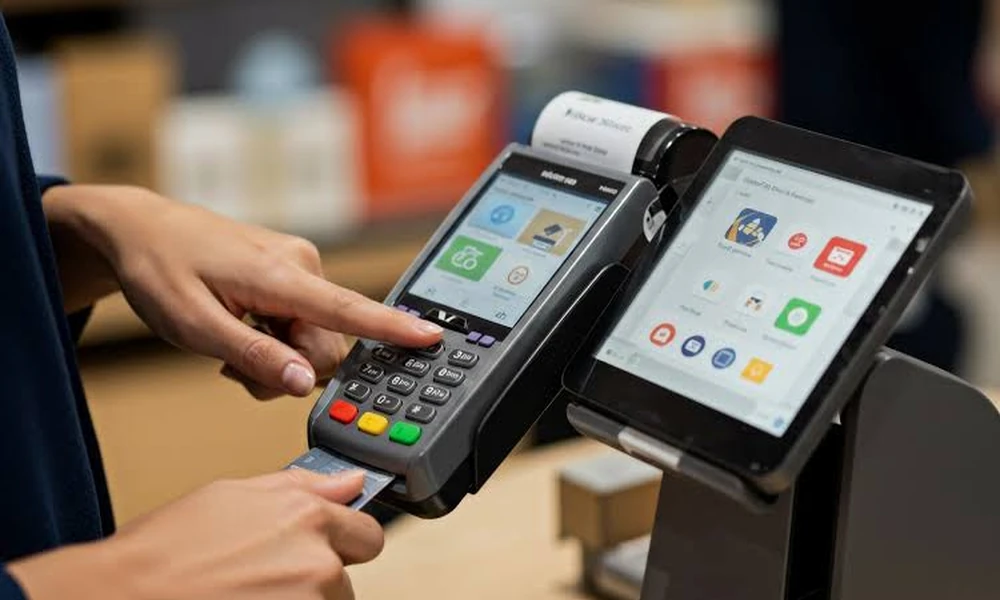
Understanding POS Hardware and Software
A POS system may include software, hardware or both.
POS Software
Software provides the interface used to record transactions, manage billing and access reports.
Some solutions operate through mobile devices, tablets or computers.
POS Hardware
- Card payment terminals
- Receipt printers
- Barcode scanners
- Cash drawers
- Compatible billing displays
Not every service business requires all these devices.
For example, a small consultancy may only need digital invoicing and supported payment acceptance.
A busy service centre may require additional equipment for billing counters.
How POS Systems Help With Payment Reconciliation
Payment reconciliation involves comparing recorded sales with actual payment collections.
For example, suppose a service business generates invoices worth ₹40,000 during one day.
Of this amount, customers may pay ₹15,000 through UPI, ₹20,000 through cards and ₹5,000 in cash.
The business should verify whether these collections match its internal transaction records.
A POS system with suitable reporting capabilities may help identify differences between billed amounts and recorded payments.
However, bank settlements, processing fees, refunds and adjustments may still require separate verification.
Regular reconciliation can help prevent missing entries and incorrect financial records.
What Should Businesses Consider Before Choosing a POS System?
Choosing a POS system requires understanding how the business operates.
Important factors include:
- Number of daily customer transactions
- Services offered
- Billing requirements
- Accepted payment methods
- Appointment scheduling needs
- Employee access permissions
- Reporting features
- Hardware compatibility
- Applicable service charges
A business with one service counter may require a simpler setup than a company operating several locations.
Owners should focus on the functions they will actually use rather than selecting software based on the number of advertised features.
Common Challenges When Introducing POS Technology
Adopting a POS system may require changes to existing business processes.
Employee Training
Employees need to understand how to create invoices, record payments and resolve transaction errors.
Data Migration
Businesses moving from manual records may need to transfer service lists, customer information or previous transaction data.
Internet Connectivity
Some POS systems rely on an internet connection for payment processing or data synchronisation.
Businesses should understand which functions remain available during connectivity problems.
Software and Hardware Costs
Subscription charges, payment device costs and support fees may affect the total expense.
Evaluating these requirements before implementation can help avoid unexpected costs.
POS Security and Customer Information Protection
Service providers may collect customer contact details, appointment information and payment records.
Businesses should ensure that this information is handled appropriately.
Use secure login credentials and restrict employee access according to job responsibilities.
Regularly review user permissions and remove access for former employees.
Avoid storing sensitive payment authentication information unless expressly permitted under applicable rules.
Businesses should also check the provider’s data protection practices, backup arrangements and available support procedures.
Understanding Merchant POS for Service Providers
A Merchant POS solution may help eligible service businesses accept customer payments and manage transaction records through supported software and payment devices.
Depending on the provider, the service may support card payments, UPI acceptance, digital receipts and settlement reporting.
Before selecting a merchant POS arrangement, businesses should check the accepted payment methods, transaction charges, settlement timelines and hardware requirements.
It is also important to understand whether the payment terminal integrates with the existing billing system.
A payment terminal and a complete business management system are not always the same product.
Service providers should confirm which billing, reporting and operational features are included before making a decision.
Conclusion
POS systems can help service-based businesses manage billing, payment acceptance and transaction records through a more organised process.
Unlike traditional retail operations, service providers may require additional features such as appointment scheduling, service invoicing and customer history.
The right system depends on business size, transaction volume and the type of services offered.
Before choosing a POS solution, owners should compare software features, hardware requirements, security practices and total costs.
A suitable system can support accurate financial records and help businesses manage everyday customer transactions more consistently.
Frequently Asked Questions
1. What Is a POS System in a Service-Based Business?
A POS system helps service providers record sales, generate invoices, accept supported payments and manage transaction information.
2. Do Service-Based Businesses Need POS Hardware?
Not always. Some businesses can use software-based POS systems, while others may require payment terminals or receipt printers.
3. Can POS Systems Manage Appointments and Customer Records?
Some POS systems include appointment scheduling and customer management features. Availability depends on the software provider.
4. Can a POS System Accept UPI and Card Payments?
Yes. Eligible POS solutions may support UPI, card payments and other payment methods, depending on the provider and selected configuration.
Understanding POS Systems for Service-Based Businesses
